Download the mobile app


learn
legal
BTC Markets Pty Ltd ACN 164 093 887 is an authorised representative (AR No. 1297122) of BTCM Payments Limited ACN 643 241 829 (AFSL No. 525840)
©2026 BTC Markets Pty Ltd. All rights reserved.
1. Go to the Recurring Buy section
Select Recurring Buy from the BTC Markets Exchange main menu to get started. You’ll be prompted to log in before creating your plan.

2. Create a new plan
Click the Create button in the top right corner.

3. Set your purchase details
In the pop-up window, choose your asset, enter an AUD amount per purchase, and select how often you'd like to buy (daily, weekly, or monthly).
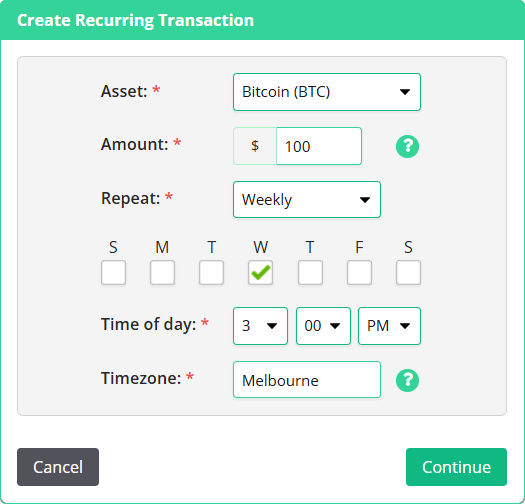
4. Confirm and activate
Review your details and click Continue to activate the plan. It will appear in your Recurring Buy section and run automatically from that point.
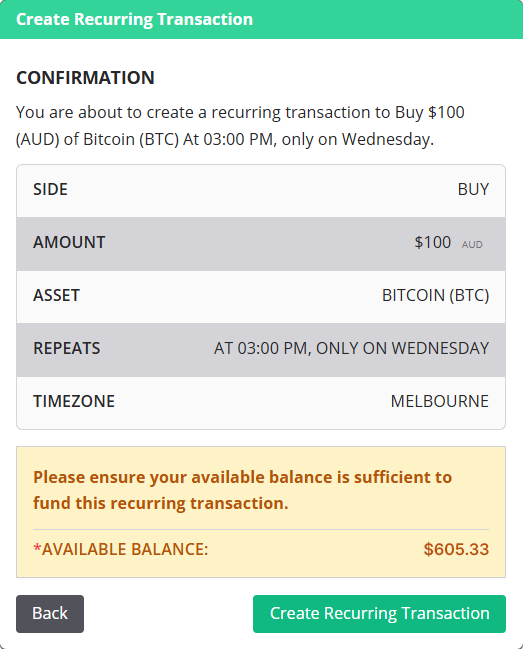
Each purchase is made at the live market price at the time it runs. This means the price you pay may differ slightly from what you see when you set up your plan. This is normal and applies to all market purchases.
Keep your account funded. If a scheduled purchase can't be processed due to insufficient funds, it will be skipped and you'll be notified by email. Purchases may also be skipped during a system outage.
Ready to build your crypto portfolio steadily over time? It takes less than two minutes to set up.
Schedule your first purchase.
This information is issued by BTC Markets Pty Ltd and is general in nature. It does not constitute financial advice or a recommendation. Past performance is not a reliable indicator of future performance. BTC Markets recommends obtaining independent advice before making any investment decision. To the maximum extent permitted by law, BTC Markets accepts no liability for any loss arising from reliance on this content. Intended for Australian residents only.
Download the mobile app
BTC Markets Pty Ltd ACN 164 093 887 is an authorised representative (AR No. 1297122) of BTCM Payments Limited ACN 643 241 829 (AFSL No. 525840)
©2026 BTC Markets Pty Ltd. All rights reserved.